

Concepts
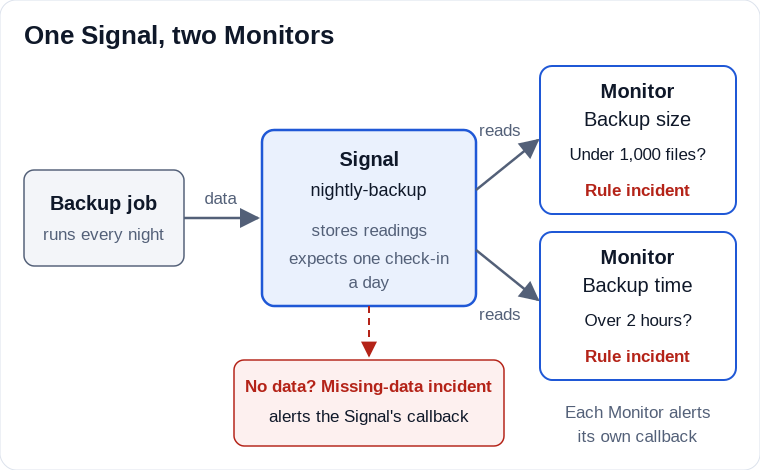
SignalSitter has two main pieces. A Signal receives what your code sends. A Monitor reads a Signal and checks its numbers against rules. This page follows one example from start to finish: a backup job that runs every night.
Check-ins
Section titled “Check-ins”A check-in is one POST from your code to a Signal’s publish URL. Your backup
job sends one when it finishes:
curl --request POST \ --url https://ingest.signalsitter.com/nightly-backup \ --header "Authorization: Bearer ${SIGNALSITTER_API_KEY}" \ --header "Content-Type: application/json" \ --data '{"files":1240,"seconds":3100}'There are two kinds:
- A stored reading carries numbers, like
filesandsecondsabove. SignalSitter keeps it, so Monitors can check it and you can read it back later. It counts toward your plan’s stored events. - An empty heartbeat has no body. It only says “I ran”. On a Signal that expects check-ins on a schedule, it’s a receipt: it keeps the Signal healthy, isn’t stored, and doesn’t count toward stored events. On a Signal with missing-data alerts off, a paused Signal, or one with Store every heartbeat on, an empty check-in is stored like any other.
Details are in Sending data to a Signal.
Signals
Section titled “Signals”A Signal is one feed of data. It owns everything about receiving them:
- its key and publish URL, such as
nightly-backup; - the readings it stores;
- how often it expects a check-in, if at all;
- missing-data incidents, and where their alerts go.
Your backup Signal expects one check-in a day. If a night passes with no data, the Signal opens a missing-data incident. When data comes back, it recovers on its own. You can also turn missing-data alerts off, for a feed that has no fixed schedule.
Create a Signal in the dashboard, with the API, or by publishing to a new key
with a manage credential. Publishing never creates a Monitor. See
Signals and Monitors.
Monitors
Section titled “Monitors”A Monitor reads one Signal and checks its readings against your rules, on its own schedule. It owns those rules, the rule incidents they open, and where their alerts go.
One Signal can feed several Monitors, and its data is stored once. For your backup job you might add two:
- Backup size opens an incident when a run backs up fewer than 1,000 files.
- Backup time opens an incident when a run takes more than 2 hours.
Each one can alert a different person or system. Data never goes to a Monitor directly. It goes to the Signal, and the Monitor reads from there.
A Monitor checks no more often than your plan’s fastest interval: every 5 minutes on Free, every minute on paid plans. How often a Monitor checks has no effect on how often you can publish.
A rule is a fixed limit on one number. “Fewer than 1,000 files” is a minimum. “More than 7,200 seconds” is a maximum. Rules can also compare a value with recent history, or add up a window of readings, such as orders per hour. Before you save a rule, its editor previews when it would have matched your stored history. See Rules.
Incidents
Section titled “Incidents”An incident is something going wrong, with a start and an end. There are two kinds, one for each piece:
| Kind | Opened by | When |
|---|---|---|
| Missing-data incident | The Signal | An expected check-in doesn’t arrive in time. |
| Rule incident | A Monitor | A reading breaks one of its rules. |
Either kind closes on its own once things are back to normal. Both appear in one incidents list, where you can acknowledge, annotate or resolve one by hand. A Signal’s page also shows its recent missing-data incidents. See Incidents.
Callbacks
Section titled “Callbacks”A callback is where an incident’s alerts go: a webhook URL, or people through Slack, email or Telegram. The Signal has one callback for its missing-data incidents. Each Monitor has its own for its rule incidents. So your ops channel can hear about a backup that didn’t run, while the storage team hears about one that came up short. See Alert destinations.
Projects
Section titled “Projects”A project groups Signals, Monitors and credentials. Every organization starts with one called General. A credential works only in the project it was made in, and teammates can be limited to the projects they need. See Members and project access.
One plan covers your whole organization, across every project. It sets two main allowances.
Slots. Every monitor slot comes with a signal slot. Free has 10 of each. Builder has 50, Smart 200 and Scale 1,250. Several Monitors can share one Signal, so your backup job with its two Monitors uses two monitor slots and one signal slot. On a paid plan you can buy more slots.
Stored events. Your organization shares a pool of stored readings. Free earns 288 a day through each calendar month, about 8,640 a month, or one stored reading every five minutes. Your nightly backup stores about 30 a month. Empty heartbeats on a scheduled Signal don’t count. Paid plans get a bigger pool for each 30-day billing period and charge overage above it, with a cap. Free has no overage. Once you’ve used what has built up so far, stored readings are refused until the next UTC day adds more.
Exact numbers and prices are in Plans and limits.
- Send your first data to a Signal: create a Signal and send data.
- Get started in the dashboard: set up a Signal and Monitor without code.
 SignalSitter documentation