

ClickHouse source
A Signal can read measurements directly from a ClickHouse query. You provide a reachable ClickHouse HTTPS endpoint, a read-only user, and a saved window query. SignalSitter sends the time range when a Monitor evaluates or a chart needs data. You do not need to build an API that translates ClickHouse rows into SignalSitter’s HTTP response format.
The Signal owns the connection and query. Each linked Monitor uses the same measurements with its own rules. SignalSitter evaluates returned readings in memory; it does not publish them to the Signal or keep a history of the query results. Your ClickHouse database remains the source of truth.
Connect a source
Section titled “Connect a source”Open the Signal’s Settings tab and choose Connect custom source → ClickHouse. From a linked Monitor, the Custom source link on Send data or Settings opens the same editor in place. Closing the editor returns you to the Monitor. This source is an advanced option; ordinary Monitor creation does not require it.
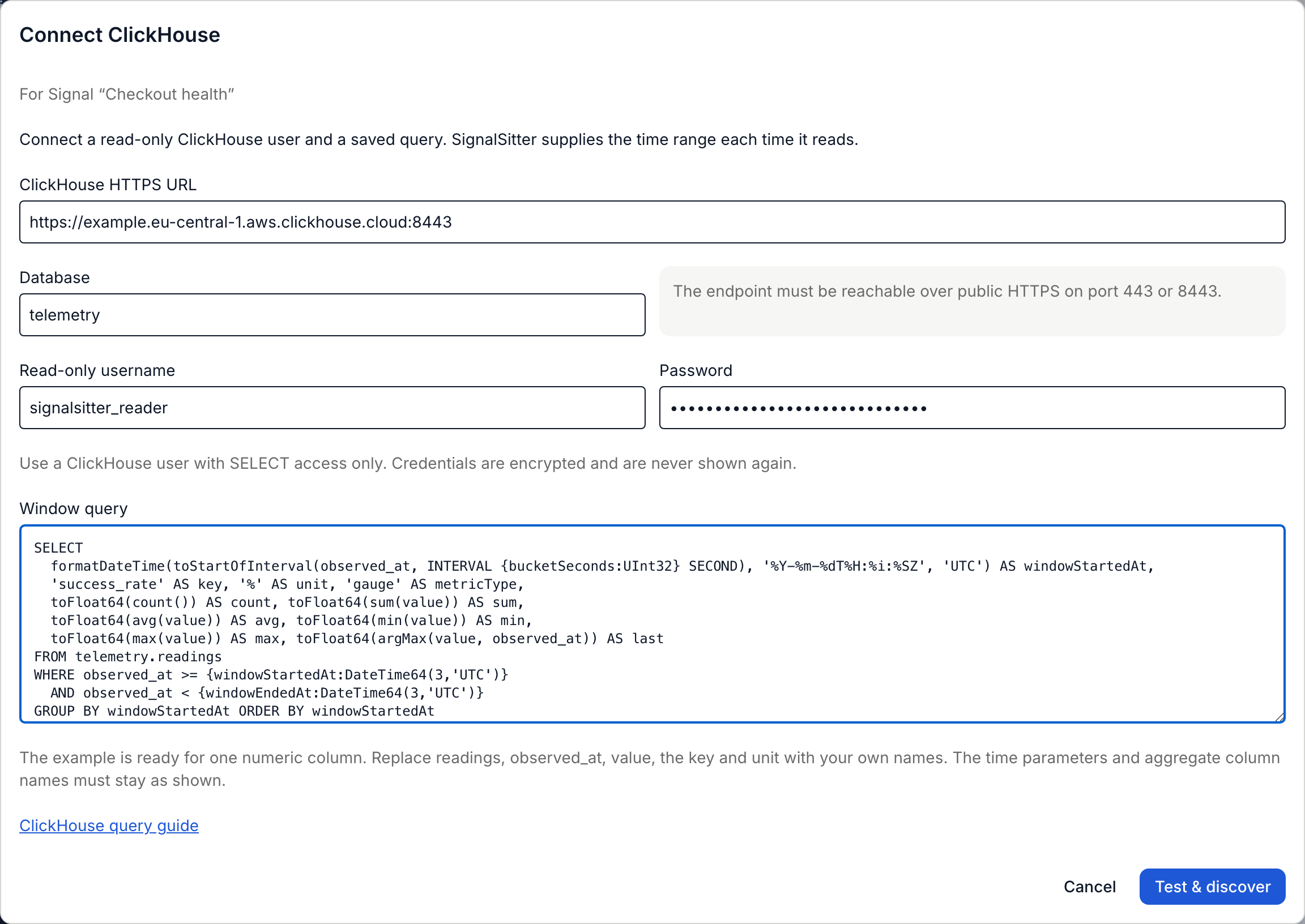
Enter:
- ClickHouse HTTPS URL: The service’s public HTTPS address, including
:8443for a ClickHouse Cloud service that uses that port. SignalSitter also accepts standard port 443. A private-only endpoint cannot be reached by this connection. - Database: The database containing the table or view you will query.
- Read-only username and password: Use a ClickHouse identity granted
SELECTon the required tables, with a profile that permitsreadonly=2and the per-request cancellation setting. This keeps the query read-only and lets ClickHouse stop it when SignalSitter’s 30-second request deadline closes the connection. A strictreadonly=1profile that forbids setting changes will fail the connection test; use a separate read-only profile that permits these two settings. The password is encrypted when saved and never returned. On the same endpoint, leave the masked fields alone when editing to retain the stored credential. - Window query: A
SELECTthat groups your observations into time buckets and returns the required aggregate columns below. SignalSitter supplies the range and bucket size as typed parameters. Do not put literal dates or aFORMATclause in the query.
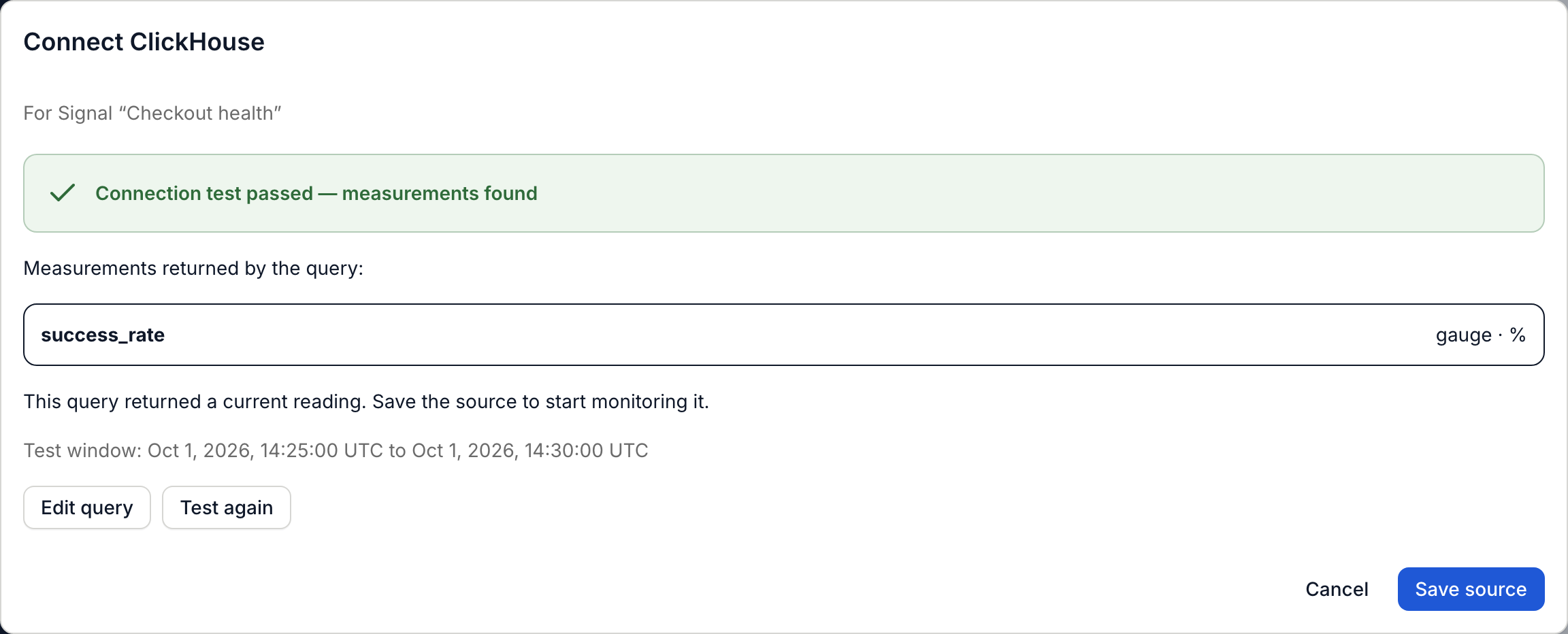
Select Test & discover. SignalSitter runs the query for a completed window, checks the result, and shows the measurement keys, units and types found. If the test returns a current reading, choose Save source. Saving turns off the Signal’s missing-publish alert and closes any open missing-data incident for that Signal. Linked Monitors can still alert from numeric rules and their own missing-data settings.
Write a window query
Section titled “Write a window query”SignalSitter binds three parameters to every query:
| Parameter | Type | Meaning |
|---|---|---|
{windowStartedAt:DateTime64(3,'UTC')} |
UTC timestamp | Start of the requested range, inclusive |
{windowEndedAt:DateTime64(3,'UTC')} |
UTC timestamp | End of the requested range, exclusive |
{bucketSeconds:UInt32} |
Whole seconds | Bucket width: one Monitor evaluation window for scheduled checks, or a coarser width for a selected chart range |
The query returns one row for each measurement in each populated bucket. Name its columns exactly windowStartedAt, key, unit, metricType, count, sum, avg, min, max, and last. windowStartedAt is the bucket start in RFC 3339 UTC form. key is a stable measurement name, unit is its display unit, and metricType is gauge or counter. The remaining columns are numerical aggregates for observations in that bucket. count must be positive; the other values must be finite and consistent with the count and extrema. SignalSitter requests JSONEachRow from ClickHouse and validates the rows before any Monitor evaluates them.
For a table readings(observed_at DateTime64(3, 'UTC'), value Float64), this query returns a value gauge in milliseconds. Replace the table, time column, value column, key and unit with yours:
SELECT formatDateTime( toStartOfInterval(observed_at, INTERVAL {bucketSeconds:UInt32} SECOND), '%Y-%m-%dT%H:%i:%SZ', 'UTC' ) AS windowStartedAt, 'value' AS key, 'ms' AS unit, 'gauge' AS metricType, toFloat64(count()) AS count, toFloat64(sum(value)) AS sum, toFloat64(avg(value)) AS avg, toFloat64(min(value)) AS min, toFloat64(max(value)) AS max, toFloat64(argMax(value, observed_at)) AS lastFROM readingsWHERE observed_at >= {windowStartedAt:DateTime64(3,'UTC')} AND observed_at < {windowEndedAt:DateTime64(3,'UTC')}GROUP BY windowStartedAtORDER BY windowStartedAtKeep the time filter in the query so ClickHouse reads only the requested range. If your table contains several metrics, return a row per key and bucket; for example, group by the time bucket and a metric_name column, then return that column as key. A stable key, unit and type are required after discovery, because Monitor rules refer to them.
Use and troubleshoot the source
Section titled “Use and troubleshoot the source”Signal Data, Monitor Overview, and the rule workbench ask the source for the selected range. SignalSitter chooses a bucket width that returns up to 32 windows across that range. The charts show a numeric scale and timestamp/value details on hover. Refresh a preview to read ClickHouse again; previews are not a stored history. A query failure or empty window makes the measurement unavailable, never zero.
The Signal’s Settings tab shows the source, last successful read and latest safe result. Choose Edit to change the query or credential, Pause source to stop scheduled reads temporarily, or Delete source inside the editor to return to internally published readings. Deleting the source does not create historical ClickHouse readings in SignalSitter.
The default request timeout is 30 seconds and the default response allowance is 128 KiB. The same timeout is sent to ClickHouse as its query execution bound, so a lost or closed HTTPS connection cannot leave an unbounded query running. Operators can adjust these using SIGNALSITTER_EXTERNAL_SOURCE_TIMEOUT_MS and SIGNALSITTER_EXTERNAL_SOURCE_MAXIMUM_RESPONSE_BYTES in the processor environment. The same public-address and TLS checks apply during setup, previews and scheduled reads. Redirects are not followed.
If the test fails, check that the service accepts HTTPS connections from SignalSitter, the user can SELECT the relevant table, the query contains the typed range parameters, and its returned columns match the names above. ClickHouse Cloud networks restricted to private access need a reachable HTTPS path before this source can connect.
 SignalSitter documentation