

Rules
A rule opens an incident when a number in your beats crosses a limit you set. Draft it in a monitor’s Alert Rules tab, check it against your history, then apply it.
You need at least one beat that carries a number first. See Publishing heartbeats for sending measurements.
Add a rule
Section titled “Add a rule”- Open the monitor, go to Alert Rules and press Add an alert.
- Under Published measurement key, choose a measurement this monitor has sent. The graph fills with its recent history.
- Pick the How values behave option that fits, such as Measured level or Count per beat.
- From Add a direct rule, choose a rule, such as Maximum.
- Enter the limit, such as Highest allowed value.
- Set the Alert conditions (below), then press Save rule. The rule is marked Not applied yet.
- Read the preview, then press Apply alert changes.
Rule types
Section titled “Rule types”| Rule | Fires when |
|---|---|
| Maximum | A reading is above the limit. |
| Minimum | A reading is below the limit. |
| Must never be zero | A reading is zero. |
| Must stay at zero | A reading is anything but zero. |
| Absolute change | A reading differs from the one before by more than the limit. |
| Percentage change | Same, as a percentage. Enter 50 for 50%. |
| Ratio maximum, Ratio minimum | This measurement divided by another (Compare with measurement) goes above or below the limit. |
Alert conditions
Section titled “Alert conditions”- First occurrence: the severity the first time a reading breaks the rule.
- Sustained occurrences: the severity once the breach continues.
- Consider it sustained after: A number of violating observations or A length of time.
| Severity | Effect |
|---|---|
| None | Records the violation. No incident. |
| Information | Records it and marks it for review. |
| Warning, Critical | Opens an incident at that severity. |
Under When this alert fires, Record violations without opening an incident lets you watch a rule before trusting it.
Measurement and data settings holds When this measurement is missing and Unit (optional). The unit is a label. It doesn’t convert values.
Preview against history
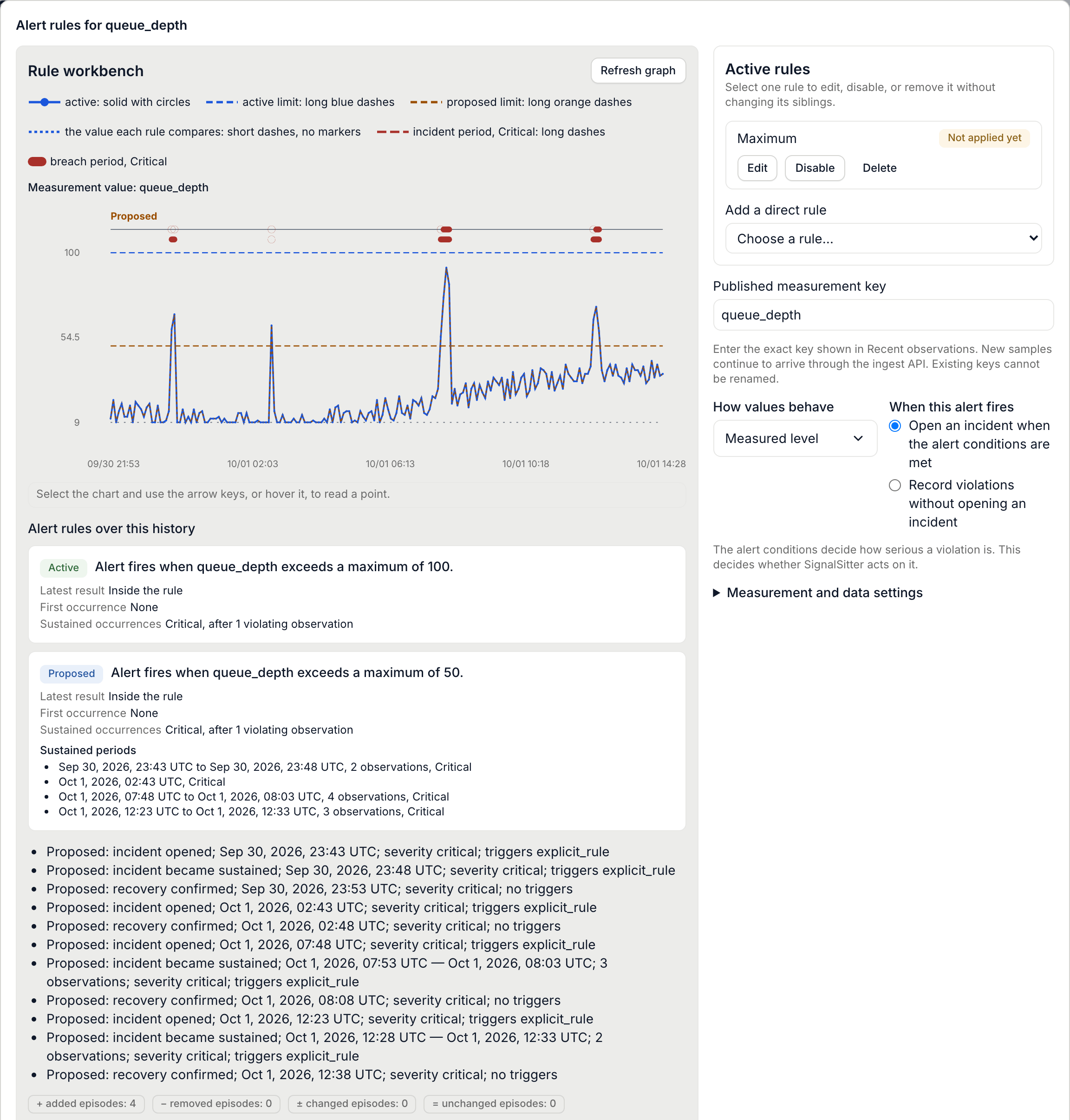
Section titled “Preview against history”The graph replays this monitor’s recent readings as a solid line. The active limit is drawn in blue dashes and your proposed limit in orange dashes. Badges below the replay count incident episodes added, removed, changed and unchanged.
The preview refreshes as you edit. Apply alert changes waits for it.
Change or remove a rule
Section titled “Change or remove a rule”- Press Edit on the measurement’s card.
- On a rule, press Edit, Disable (or Enable) or Delete.
- Press Apply alert changes. Cancel discards everything.
A monitor can have alerts on up to 16 measurements.
 SignalSitter documentation